Home
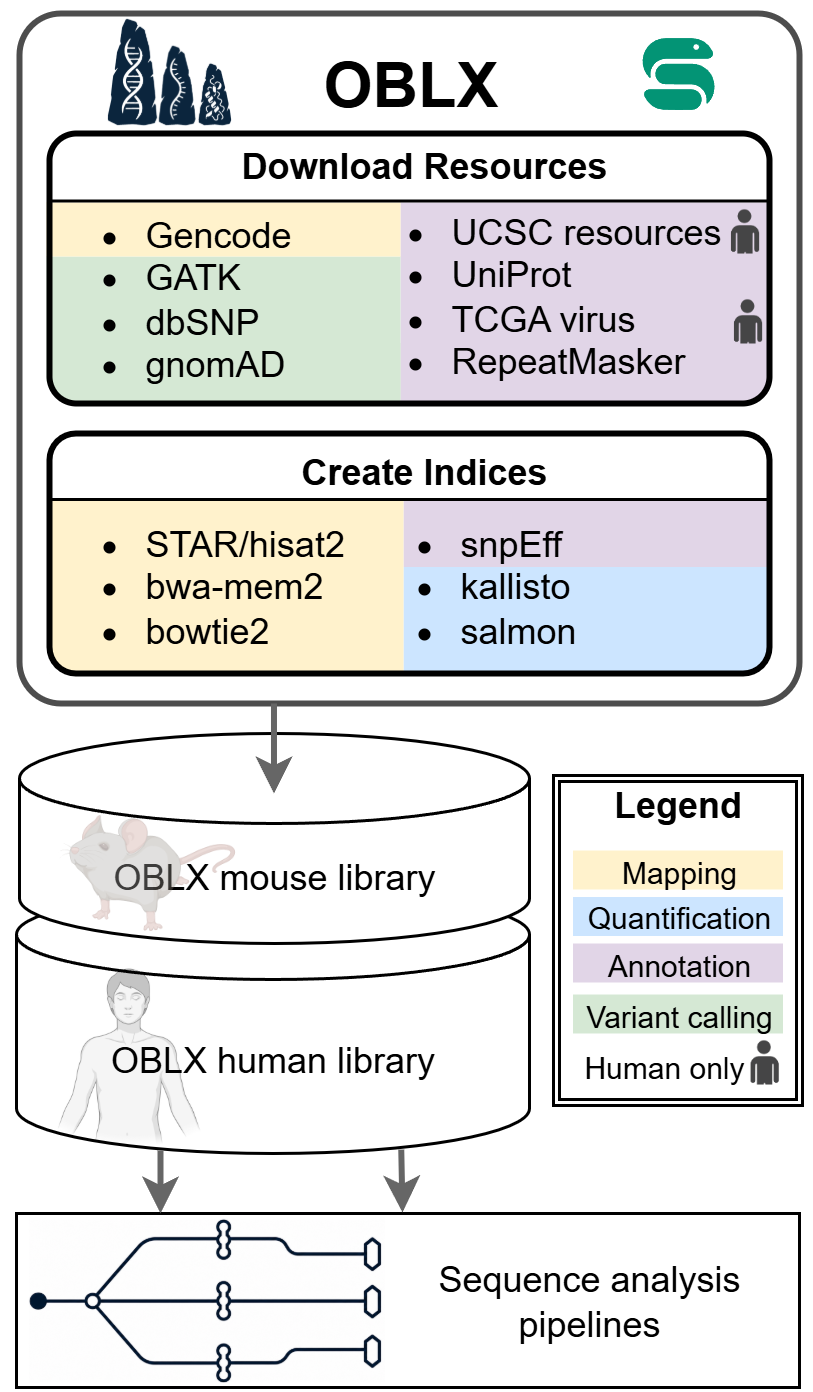
OBLX (/ˌɒbl.ˈɛks/) is a Snakemake (Mölder et al., 2021) pipeline which downloads reference genomes, genome annotations and further resources, and generates from these resources several indices required for various bioinformatics tools. The pipeline consists of two independently executable steps: Download Resources and Build Indices. Download Resources retrieves the resources and prepares the data for bioinformatics index generation. The reference genome and genome annotation are downloaded from GENCODE (for human and mouse) or from Ensembl (for any other organism available in Ensembl). The preferred genome assembly version, GENCODE release and organism can be specified via the config file. Additional resources are retrieved from GATK, UCSC and gnomAD (see Download Resources for details). Build Indices then generates tool-specific indices. The resulting genome library is consistent with respect to chromosome, transcript and gene naming and supports an extensive set of bioinformatics tools, all listed in Supported Tools.
Pre-built indices
Pre-built OBLX libraries for human GRCh38 v49 and mouse GRCm39 vM36 are soon available for download via ftp://easyfuse.tron-mainz.de/oblx.
# human
wget ftp://easyfuse.tron-mainz.de/oblx/v1.0.0/human/GRCh38_49

# mouse
wget ftp://easyfuse.tron-mainz.de/oblx/v1.0.0/mouse/GRCm39_M36
To verify the files run
sha256sum -c checksum.txt
Installation
Clone the repository:
git clone https://github.com/TRON-Bioinformatics/oblx.git
Install Snakemake (see https://snakemake.readthedocs.io) and pandas (see https://pandas.pydata.org).
Note: We recommend using pixi (https://pixi.prefix.dev/) to replicate the environment used in the tests. Therefore, install pixi and run
pixi shell.
Usage
The steps Download Resources and Build Indices are run consecutively when executing (to run them independently, see the respective section):
snakemake -s workflow/Snakefile \
      --directory </path/to/output/directory> \
    --latency-wait 60 \
    --software-deployment-method [conda|apptainer] \
      [--configfile <path/to/config/file>] \
      [--profile </path/to/cluster/profile/>]
--directory: Directory to store the results of the workflow.--software-deployment-method: Eithercondaorapptainer. Container images for apptainer are configured inconfig/container_config.yaml.--latency-wait: Seconds to wait for files to appear (recommended60to account for IO latency of large files).--configfile(optional): Overrides default configuration if provided, e.g. organism or reference genome version. See Configuration.--profile(optional): Snakemake cluster profile, e.g. to submit jobs to an HPC scheduler.
Input
OBLX does not require any user-provided input. You only specify the output directory and, if non-default settings are desired, adapt the configuration.
Output
The output of the pipeline is written to the directory specified with
--directory. Descriptions of the downloaded genome resources are documented in
Download Resources; descriptions of
the generated indices are documented in
Build Indices.
Supported bioinformatics tools
See Supported Tools.
Contribution
We welcome contributions! Please see CONTRIBUTING and developer_guide for guidelines.
About
OBLX was originally developed by Luis Kress and Johannes Hausmann at TRON - Translational Oncology at the Medical Center of the Johannes Gutenberg University Mainz gGmbH (non-profit).
Main developers:
References
- Mölder, F., Jablonski, K. P., Letcher, B., Hall, M. B., Van Dyken, P. C., Tomkins-Tinch, C. H., Sochat, V., Forster, J., Vieira, F. G., Meesters, C., Lee, S., Twardziok, S. O., Kanitz, A., VanCampen, J., Malladi, V., Wilm, A., Holtgrewe, M., Rahmann, S., Nahnsen, S., & Köster, J. (2025). Sustainable data analysis with Snakemake. F1000Research, 10, 33. https://doi.org/10.12688/f1000research.29032.3
- Figure generated with BioRender icons.